Why do Mac graphics cards fail?
Graphics card failures on Macs are one of the most common problems on Apple computers that are a few years old, especially on models with a dedicated GPU a…

Graphics card failures on Macs are one of the most common problems on Apple computers that are a few years old, especially on models with a dedicated GPU and very compact designs. It does not mean they fail more than brands like HP, Acer or Asus, but it is true that certain models left the factory with problematic graphics chips or have worked for many years at very high temperatures.
Before getting into symptoms and models, it is key to ask yourself: when was the last time you serviced your Mac? We are talking about internal cleaning, fans without dust, replacing the thermal paste with a quality one (not the typical low-conductivity white paste), etc. A computer with accumulated dirt and no maintenance is perfect ground for overheating and GPU failures.
The failure usually occurs when we subject the graphics chip (GPU) to continued stress: high-definition video playback, video editing, 3D design, demanding games or connecting to several monitors. If the cooling is not adequate, the GPU suffers, and over time artifacts, restarts or black screens appear.
Over the years, Apple has had specific series with graphics problems. For example, the MacBook A1226 and A1260 (2007–2008) with the NVIDIA 8600M GT GPU mounted defective chips that ended up failing with use.
Later, many 2011 MacBook Pros and the 2012 Retina MacBook Pros became sadly famous for their image failures, unexpected restarts and screens with no signal due to the chip of the GPU in charge of outputting video.
And since no brand is infallible, factory failures were also detected in 2015, 2016 models and symptoms of overheating in some 2018 MacBooks, which could shorten the useful life of the graphics card despite Apple's software updates.
In summary: if your Mac belongs to any of these classic models with a dedicated GPU, it is much more likely to suffer a graphics failure throughout its useful life:
- MacBook Pro 15” A1286
- MacBook Pro 17” A1297
- MacBook Pro Retina 15” A1398
- iMac 21.5” A1311
- iMac 24” A1225
- iMac 27” A1312 or A1418
Macs with an Apple Silicon chip (M1, M2, M3) integrate the GPU into the processor itself, so the type of repair is different, although the visual symptoms can be similar.
How to know if the source of the problem is the graphics card?
The symptoms of a graphics failure can be confused with a screen, motherboard or even RAM memory fault. A specialized technician analyzes several factors, almost always starting with the excess heat in the ventilation area and the base of the laptop, where the heatsinks are located.
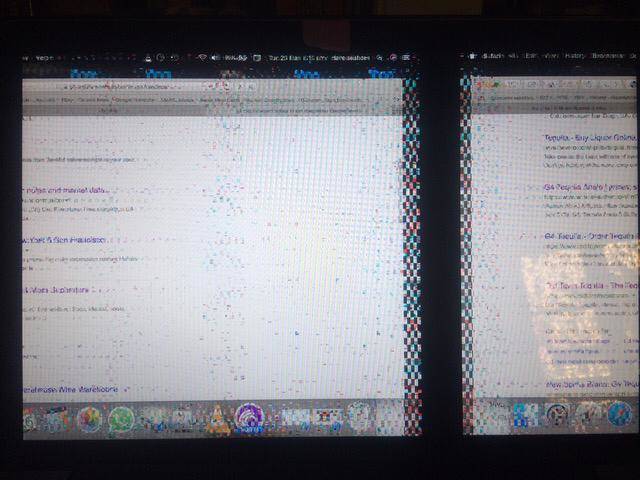
Some typical symptoms of GPU failure are:
- The image suddenly disappears or the computer freezes.
- The Mac restarts for no reason when playing videos or using demanding apps.
- The screen goes black, but the fans and LEDs turn on.
- Squares, lines or strange artifacts appear in the image.
In the early stages, there is sometimes still time to repair or replace the graphics chip without having to change the entire motherboard.
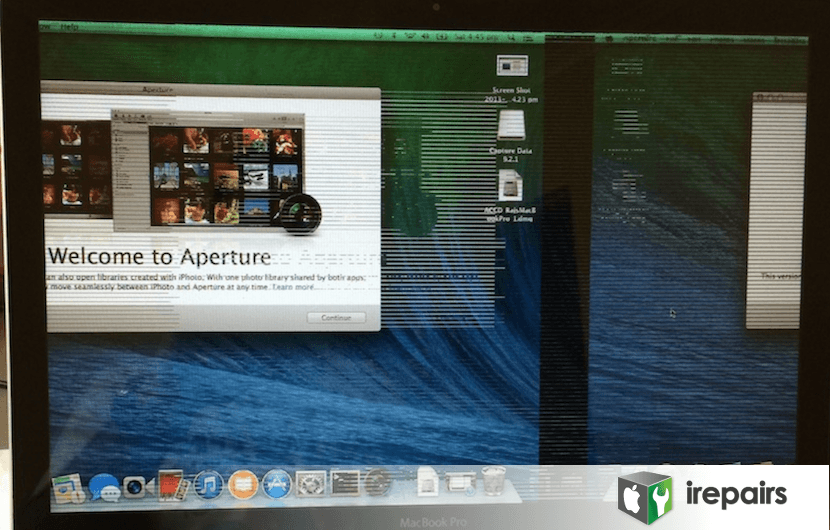
On many occasions, the graphics failure is clearly seen on screen: colored squares, vertical or horizontal lines, duplicated image or total absence of signal.
- Vertical lines on one or several sides of the screen.
- Horizontal lines that appear and disappear when moving windows or playing video.
- On startup, the macOS loading bar does not finish completing and the screen goes blank or the computer restarts in a loop.
- Black screen without hearing the startup sound.
- The computer does not turn on nor emit any sound. (In this case, it could also be the motherboard or power supply. You can consult our specific articles for MacBook and iMac that do not turn on).
- Sudden shutdowns when playing videos, viewing photos or using software that demands graphics; it is usually accompanied by very high temperatures.
- “Crazy” pixels that appear for no reason in different areas of the screen.
- Double screen, as if the same image appeared duplicated or shifted.
How to rule out a screen, RAM or motherboard problem
Some symptoms point to other components and help rule out the GPU as the source of the problem. As a guideline, you can look at the following:
- If you connect an external monitor and the external image looks perfect, but the built-in screen fails, the problem is most likely in the panel or in the internal video cable, not in the GPU.
- If the screen loses brightness on one side, flickers at times or changes tone, it is usually a sign of failure in the screen itself or in the backlight.
- If a folder with a question mark appears on startup, the problem is usually in the disk or the system, not in the graphics.
- If you hear three repetitive beeps when turning on the Mac and it does not boot, it is normally related to the RAM or the motherboard.
In any case, the definitive diagnosis must be made by a technician with experience and specific testing tools.
Repair the graphics card of your Apple computer
When the computer is out of warranty, the usual response from official technical services is usually to change the entire motherboard. This drives the budget to figures very close to the cost of a new Mac.
At iRepairs we offer a much more reasonable alternative: repair the fault by replacing the graphics chip or we repair the affected area of the board, keeping the rest of the components in good condition and with a repair warranty.
If you suspect a graphics failure, you can contact us according to your Mac model:
- Repair MacBook graphics card
- Repair MacBook Pro graphics card
- Repair iMac graphics card
- Repair iMac Pro graphics card
- Repair Mac Pro graphics card
- Repair Mac mini graphics card
In addition to the warranty, you have the peace of mind of hundreds of satisfied customers and verified reviews on Google and Facebook. Our diagnosis is completely free, so you can decide based on data whether it is worth repairing your computer.
You can contact us by calling 933 900 524, filling out the form in the contact section or by visiting directly our workshop in Barcelona during business hours. We will help you extend the useful life of your Mac with a professional and transparent solution.